
Independent IFS Cloud practice · Implementation
The business impact of implementing IFS Cloud ERP
Key takeaways
- The gains from IFS Cloud come from structure, not from features: site clusters, a shared parameter set, and a small number of automations that people actually use.
- Update-safe is a design decision taken on day one, not a cleanup job before an upgrade. What you build inside the Extensibility Framework survives R1/R2; what you build around it becomes your problem twice a year.
- Supply chain money leaks where nothing is broken: an order nobody confirmed, a receipt nobody invoiced, a price that changed quietly. None of it throws an error.
- AI in an ERP is only as good as the data discipline underneath it. Forecasting on a master data set nobody owns produces confident, well-formatted nonsense.
- Crystal Reports layouts do not carry across to IFS Cloud. The report inventory has to be triaged, not migrated, and the triage is the bigger job.
- Measure two or three things you were already arguing about before go-live. A benefits case with fifteen KPIs gets quietly abandoned by month four.
Most articles about ERP business impact are written from the brochure. This one is written from the projects. I have spent seventeen years inside IFS, from Apps 7.5 through Cloud, and the pattern that repeats is not that companies pick the wrong system. They pick a capable one and then implement it in a way that throws the capability away: a template nobody reuses, an automation layer nobody trusts, reports rebuilt one for one from the old system because nobody had the authority to delete any of them.
So this is not a list of what IFS Cloud can do. It is a walk through the places where a decision taken during implementation determines whether the platform pays for itself or just replaces one kind of manual work with another. Where a topic deserves its own treatment, I have linked to the longer piece on the ifs-erp.com blog rather than compressing it into two sentences here.
1.Site clusters, and the thing they actually save you
Grouping sites so they share parts, defaults and process setup is sold as a speed feature. It is really a consistency feature, and the speed is a side effect. When site four inherits the purchasing parameters that sites one to three already run on, you are not just saving a week of configuration. You are removing the possibility that site four quietly does receiving differently, which is what costs you two years later when someone tries to compare performance across the group and finds the numbers are not measuring the same event.
The catch is that a cluster only helps if the template being cloned is one somebody defended. Rolling out a bad standard quickly is worse than rolling it out slowly, because a slow rollout at least gives each site a chance to object. I ask for the template to be signed off by the person who will own the process across all sites, not by the site that happened to go first. That is also where the multi-site purchasing decisions belong: whether demand consolidates centrally, and how stock moves between sites once it has.
Further reading: centralised purchasing in IFS Cloud, distribution orders between sites, and from planning to go-live.
2.Automation without a development team
IFS Cloud gives you three tools that cover most of what people used to write code for, and knowing which one to reach for is the whole skill. A Quick Report reads data out: a saved query for a list or an extract, with no logic. A Custom Field stores something the standard data model does not. A Custom Event reacts when a row changes, and can hand off to a Workflow that routes an approval, sends a notification, or calls out to another system.
The failure mode is predictable. Teams discover Custom Events, like them, and attach one to everything. Six months later there is an event layer nobody can explain, firing on saves that were never meant to be significant, and the business has learned to ignore the notifications it produces. The second failure mode is subtler: reaching for a Custom Event when the requirement is actually a scheduled check. An event fires when a row changes. It cannot fire because a row has not changed, which is exactly what an unconfirmed order or an untouched receipt is.
Where the requirement crosses a system boundary, the answer is usually an interface rather than an in-system automation. IFS Cloud's OData projections are the normal integration surface, and keeping the orchestration outside IFS keeps that logic out of your ERP, where it would otherwise become one more thing to retest at every release.
Further reading: Custom Events explained, Quick Reports vs Custom Fields vs Custom Events, IFS Cloud API integration, orchestrating IFS Cloud with n8n. Work that has already been built once sits in the configurations and interfaces sections of the marketplace.
3.Customisation that survives the next release
IFS Cloud ships R1 and R2 every year. That cadence is the biggest single change in how you should think about customisation, and it is where legacy habits do the most damage. On Apps 9 or 10 an upgrade was an event you prepared for over months, so carrying technical debt between them felt survivable. On Cloud it arrives twice a year, and anything built outside the Extensibility Framework has to be checked, and often reworked, on that same rhythm.
The boundary is simple to state and easy to cross by accident. Extending the data model with Custom Fields, adding logic through Custom Events and Workflows, adapting screens through configuration: all inside the contract, all carried forward. Touching a core object, or building a report or an interface directly against an internal view rather than a published projection, puts you outside it. Nothing stops you at the time. The bill arrives at the next release, and at every release after that.
I have watched this go wrong in both directions. Companies that refuse all extension end up with a shadow layer of spreadsheets doing the work the system was not allowed to do, which is worse, because at least a customisation is visible. The honest position is that some extension is necessary, and the only real question is whether it is built where the platform will maintain it for you.
Further reading: update-safe extensions, the true cost of customisation, clean core in an SCM context, the upgrade tax, the upgrade readiness checklist, and what a release actually brings, with 25R2 purchasing as the worked example. Scoped modification work is listed under marketplace modifications.
4.Supply chain: the expensive leaks are all silent
Ask a buyer what goes wrong and you get something dramatic: a late shipment, a line stopped for a missing part. Look in the data and the costly problems are the undramatic ones, because nothing in the system objects to them.
| What is sitting there | Why nobody sees it | What it turns into |
|---|---|---|
| A released PO the supplier never acknowledged | The order is valid and open. No field says "ignored" | A delivery date everyone planned around that was never agreed |
| Goods received, invoice never matched | Both records are individually correct | An accrual that grows quietly until period end |
| A supplier price that moved between orders | The new price applies cleanly, exactly as configured | Margin erosion found during an annual review |
| A buyer who stopped ordering from a usual source | Every individual order is legitimate | Concentration risk, or a supplier problem nobody escalated |
All of this is detectable, and all of it is readable through standard OData projections on a read-only account. That means a monitor can look for it daily without touching a record, installing an object, or adding anything the next release has to be checked against. It is the design principle behind the SCM Automation Pack, and the reason the five-day exception scan exists as a way to see what is already in your own data before committing to anything ongoing.
On the physical side the same principle applies to warehouse work. Picking strategy and packing proposals are configuration decisions that quietly set your throughput ceiling, and they are rarely revisited after go-live.
Further reading: unconfirmed purchase orders, what unmatched receipts do at period end, supplier price changes, advanced picking strategies, the packing proposal.
5.AI, and the part the demo leaves out
Anomaly detection, demand forecasting and predictive maintenance are genuinely useful, and they all rest on the same unglamorous foundation: whether your master data is good enough for a model to learn from. A forecast built on lead times copied out of the legacy system in 2019 and never reviewed will be precise, confident and wrong, and it will be harder to challenge than a human guess because it arrives with a number attached.
The second thing the demo leaves out is what happens to the output. Detection is the easy half. The half that decides whether any of it pays off is routing: who receives the signal, how it reaches them, and what happens when they do nothing. An alert stream with no named owner and no escalation is a mailing list, and people unsubscribe from mailing lists in their heads long before they do it in the client.
That is why I design exception rules around the recipient rather than the condition. One deduplicated digest per owner per day beats forty individual notifications that are each technically correct. And a rule that cannot state in one sentence what the recipient is supposed to do about it does not ship.
Further reading: alert fatigue and exception design, the cost of missed exceptions, detecting supplier behaviour change, the data attention gap, assumed vs confirmed records, read-only OData monitoring.
6.Life after Crystal Reports
Crystal Reports layouts from Apps 9 and 10 do not carry across to IFS Cloud. That is the fact that matters for your plan, whatever any vendor's support calendar says, and it is usually discovered later than it should be, because reporting gets treated as a workstream that can start once the real configuration is done.
IFS Cloud splits the job across different tools. Quick Reports handle lists and extracts: saved queries, no layout ambition, self-service for anyone who can be trusted with a data set. Laid-out business documents are produced through IFS Cloud's own report layout tooling. Analysis and dashboards belong in the reporting and analytics layer rather than in a printed report at all. Trying to recreate a 200-item Crystal inventory inside any one of these is how reporting becomes the critical path.
The work that actually saves you time is triage, and it is a business job rather than a technical one. Pull the usage data first. Most report inventories contain a long tail nobody has run in two years, a middle band that exists because one person likes the format, and a small core the business genuinely runs on. Rebuild the core properly, convert the middle band to Quick Reports or a dashboard, retire the tail. The conversation about retiring the tail is the hard part, which is why it needs to start early and needs someone senior to close it.
Further reading: when a Quick Report is the right answer, and the reports section of the marketplace.
7.Access, segregation of duties, and the audit you have not had yet
Permission sets in IFS Cloud are capable enough to express proper segregation of duties. Whether they end up doing so is decided in the first six weeks of the project, when someone is under time pressure and the fastest way to unblock testing is to grant a broad set to a group and move on. That grant is almost never revisited, because nothing breaks. It surfaces at the first external audit, when a tester asks who can both create a supplier and approve a payment to it, and the honest answer takes a fortnight to assemble.
Design the role model against the process rather than the org chart, and build it while the process design is still fresh in everyone's head. It costs days then and weeks later. The same applies to standards work: if you operate under ISO requirements, the evidence those audits want is largely a by-product of decisions you are already taking, provided you record them as you go instead of reconstructing them afterwards.
Further reading: RBAC and segregation of duties, permission sets in IFS Cloud, ISO standards in IFS Cloud, and the security section of the marketplace. My own view on the wider ownership question sits on the data governance page.
8.Data migration, which quietly owns your go-live date
Every implementation plan has a migration workstream, and most are optimistic by the same margin. The reason is consistent: the effort is not in loading the data, it is in deciding what the data should say. Loading is mechanical. Agreeing that these 4,000 part records are the ones worth keeping, that this status code maps to that one, and that a customer with no valid tax ID is a customer you are not going to migrate, is a series of business decisions with no obvious owner.
Two habits change the outcome. Rehearse the load more than once, on a schedule, with a defined cut of source data each time, so the failure list shrinks between rehearsals instead of being discovered on cutover weekend. And treat validation as its own deliverable with its own sign-off rather than as the last step of loading, because IFS Cloud enforces its business rules at load time: well-formed source data can still be rejected for violating application logic nobody had read.
Further reading: the data migration checklist, how FNDMIG and the Data Migration Manager fit together, and the data migration section of the marketplace.
9.The risk that is not in the software
In most of the companies I work with, a large amount of operational knowledge lives in one person's head and one person's spreadsheet. The buyer who knows which supplier actually delivers on time regardless of what the lead time field says. The planner whose workbook reconciles two things the system does not reconcile. None of this shows up in an ERP assessment, and all of it walks out of the building when that person leaves.
An implementation is the one moment when you have a mandate to surface it. Every shadow spreadsheet is a documented requirement waiting to be read: it exists because the system does not do something, and finding out what that something is tells you more about your real process than a workshop will. Some of them should become configuration. Some should become a Quick Report. A few are genuinely someone's judgement and should stay human, but at least then you know where they are.
The same logic applies to the implementation record itself. Decisions taken in month two get questioned in month eleven by people who were not in the room, and a project that cannot answer "why is it set up this way" reopens settled arguments for the rest of its life.
Further reading: shadow spreadsheet risk, knowledge loss when people leave, buyer knowledge concentration, and the implementation documentation kit if you would rather not build the templates from scratch.
10.What to measure, and how to keep measuring it
I am wary of quoting percentage improvements. Published ranges come from situations you cannot inspect, with baselines nobody defined, and a number borrowed from another company's business case is not evidence about yours. What I can offer is the short list of measures that survive contact with an actual steering committee.
- Pick metrics you were already arguing about. If nobody argued about on-time supplier delivery before the project, nobody will defend it as a benefit afterwards.
- Take the baseline before go-live, from the old system. This is tedious and it is the only chance you get. A benefit you cannot baseline is a benefit you will eventually be asked to withdraw.
- Keep it to three. Fifteen KPIs is a spreadsheet that gets maintained for four months. Three get reported for years.
- Separate "we saved money" from "we can now see it". Visibility is a real benefit and a different one. Claiming it as cash is how a benefits case loses credibility.
- Re-measure on a fixed date, not when it looks good. A quarterly slot in the calendar, owned by a named person, beats an ad hoc review after a good month.
Further reading: ERP ROI analysis, why go-live is a load test, the implementation crisis.
11.Where to start if you are already mid-flight
If you are live on IFS Cloud and this article has described your situation rather than your plan, the order that works is roughly this. Find out what is actually in your data before redesigning anything, because the exception population usually contradicts the received wisdom about where the problems are. Then fix the governance decisions that get harder with time: the role model, the report inventory, the ownership of master data. Automation comes after that, not before, because automating a process nobody owns only makes it produce wrong answers faster.
What I do is on the offer page, the platform view is on the IFS Cloud page, and the process side sits under business process optimisation. The applications themselves, including the read-only exception monitoring described in section 4, live on ifs-erp.com.
12.Frequently asked questions
Is it too late to make an implementation update-safe if we are already live?
No, but the work changes shape. Before go-live it is a design decision that costs nothing extra. After go-live it is an inventory exercise: list everything built outside the Extensibility Framework, establish what each item actually does, and decide case by case whether to rebuild it inside the contract, replace it with standard functionality, or accept the maintenance cost knowingly. The last option is legitimate. What is not legitimate is not knowing which category each item falls into, which is the usual starting position.
Do we need AI features to get value out of IFS Cloud?
No. In most projects I see, the unclaimed value sits in exceptions a plain query would find: orders nobody confirmed, receipts nobody invoiced, prices that moved. That is rule-based detection rather than machine learning, and it works on data that is merely adequate. Model-driven forecasting is worth doing once master data has an owner and a maintenance routine, and worth postponing until it does.
Can exception monitoring be added without installing anything in our IFS Cloud?
Yes, and that is the approach I prefer for anything that only needs to read. Standard OData projections plus an integration account with read permission are enough to detect the exception patterns in section 4. Nothing is installed in IFS, nothing is written back, and there is no object for the next R1 or R2 release to break. If you want to see the output before committing to anything ongoing, the five-day exception scan produces the same report in observation mode only.
How long should we allow for moving off Crystal Reports?
Budget the triage, not the rebuild. Pulling usage statistics and getting a decision on what to retire takes longer than rebuilding the reports that survive, because it needs business sign-off rather than developer time. Start it in parallel with configuration rather than after it, and give the retire list an owner with the authority to say no. Teams that skip this step rebuild everything one for one and carry the whole inventory forward, including the part nobody has opened since 2019.
Are site clusters worth it for only two or three sites?
The configuration saving is small at that scale. The consistency saving is not, and it compounds: two sites configured independently will diverge on receiving, costing and reporting definitions within a couple of years, and reconciling them later is considerably more work than agreeing a shared template now. If there is any prospect of a fourth site, an acquisition, or a group-level report, treat it as worth it.
13.About the author
Dariusz Myśliwiec: 25+ years in ERP and supply chain, 17+ on IFS (Apps 7.5–10 and IFS Cloud). IFS Certified Associate Consultant. PRINCE2® 7. Based in Kraków, delivering remotely across Europe and globally through an independent practice.
Selected clients: Fugro · LGC · BVI Medical · Betafence (PRÆSIDIAD) · Barlinek · NGK Ceramics · Newag · Oleofarm.
IFS is a registered trademark of IFS AB; this practice is not affiliated with IFS AB.
Want to know which of these applies to your implementation?
If you are scoping an IFS Cloud implementation, or you are already live and suspect the value case has quietly gone missing, a short call is the fastest way to work out which two or three of the eleven sections above are actually costing you something.
- Details
Logistics Transformation
IFS Cloud SCM Mastery: Beyond the Finish Line
The Paradigm Shift: From Software to Ecosystem
IFS Cloud is more than a tool. It is a paradigm shift in how global supply chains operate. In an era defined by the Moment of Service™, logistics is no longer a back-office function. It is the frontline of customer satisfaction. By leveraging advanced automation and real-time intelligence, enterprises move beyond reactive logistics to a proactive, «finish line» mentality where risks are mitigated before they reach the customer.
With the release of IFS Cloud 25R2, the introduction of Agentic AI and Digital Workers has altered the SCM landscape. These are autonomous entities capable of executing complex workflows, such as re-routing shipments during port strikes or automatically adjusting safety stock based on weather-driven demand shifts.
1. Automated Supplier Performance
Traditional supplier management is often hindsight-driven. IFS Cloud flips the script with automated scorecards that track KPIs in real-time. This ensures that delivery, quality, and compliance are always under the microscope.
- Real-Time Metric Aggregation: Every delivery and quality check is instantly ingested into the digital profile.
- Risk-Based Sourcing: The system analyzes global trends, flagging suppliers in regions experiencing instability before an order is placed.
2. Real-Time Inventory Visibility
Monthly inventory reconciliations are a liability. Continuous visibility through IFS Cloud dashboards allows planners to identify stockouts and bottlenecks instantly, ensuring working capital is always optimized.
The integration of the IFS Warehouse Management System (WMS) with IoT sensors allows for «living» inventory. When a pallet moves, the digital twin updates. Using IFS.ai Copilot, warehouse managers can optimize picking routes in real-time, reducing travel distance by up to 30%.
The Smay Courier Interface: Hyper-Automation
A prime example of automation is the IFS Cloud Courier Interface. For companies like Smay, the «last mile» is often the most dangerous for data integrity. The interface validates recipient phone numbers and address integrity automatically, connecting directly with carriers like DHL and ROHLIG (SUUS).
- Zero-Touch Labeling: Labels are generated the moment a shipment is «closed» in the WMS.
- Instant Tracking: The digital thread remains unbroken from the warehouse floor to the customer’s doorstep.
3. End-to-End Traceability
Compliance is embedded into every material movement. From raw material procurement to final dispatch, the system maintains an immutable digital thread, making audits easy and recall management surgical.
In industries like Aerospace or Life Sciences, traceability is a legal requirement. IFS Cloud provides granular visibility down to the individual component level and automated checks against global «denied party» lists.
4. AI-Driven Forecasting
Intelligent planning tools synchronize historical sales with market trends. This allows for real-time adjustments to forecasts, ensuring your warehouse reflects future demand, not past mistakes.
The IFS.ai engine utilizes «Demand Sensing.» It looks at what happened yesterday, the weather forecast for tomorrow, and social media trends suggesting next week’s demand shifts.
Logistics & Implementation FAQ
How does IFS Cloud reduce operational risk?
By automating rule-based approvals and validating data at the source, the system prevents errors from cascading. Using IFS Loops Digital Workers, the system can autonomously intervene when a risk threshold is met.
Can third-party couriers be integrated directly?
Yes. Specialized API interfaces for carriers like DHL and ROHLIG (SUUS) allow for automated label printing, tracking number retrieval, and status updates directly within the IFS environment.
How does this support ESG and Sustainability goals?
IFS Cloud optimizes logistics routes to reduce fuel consumption and tracks the carbon footprint of every part through the Sustainability Management module.
Key Insights
- Risk Mitigation: Automatic data validation prevents delivery failures.
- Operational Speed: Direct courier communication skips manual entry steps.
- Data Integrity: Centralized tracking for all global shipments.
- Sustainability: Optimized routing and reduced re-shipments.
- Details
Introduction
In IFS Cloud, a site cluster is a business structure that groups multiple sites under one administrative umbrella. It simplifies mass creation of inventory parts, ensures consistent defaults across sites, and accelerates multi-site rollouts. Unlike a technical Kubernetes cluster, which manages servers and infrastructure, the site cluster exists for business process efficiency.
What Is a Site Cluster?
A site cluster provides a hierarchical grouping of sites. Nodes represent regions, countries, or divisions. Each node can hold several sites, and cluster-level defaults cascade down to individual sites.
Key benefits:
-
Mass creation of parts across multiple sites
-
Standardization of sourcing, sales, and purchasing defaults
-
Faster onboarding of new sites and acquisitions
-
Reduced manual setup errors
How to Use Site Clusters
Practical applications include:
-
Mass part creation: Define an assortment once and replicate it across all sites in the cluster.
-
Administrative control: Defaults defined at cluster level are inherited by connected sites.
-
Process automation: Streamline procurement, distribution, and warehousing setups across regions.
-
Governance: Reduce risk of fragmentation by enforcing consistent part master data.
How to Configure a Site Cluster
1. Create the Cluster Structure
-
Navigate to Site Cluster in IFS Cloud.
-
Define the root node (e.g. “Europe Operations”).
2. Add Levels and Nodes
-
Add levels to reflect hierarchy (Region → Country → Site).
-
Each node inherits settings from its parent.
3. Connect Sites
IFS Cloud Documentation
-
Connect existing sites via Query Sites or manual entry.
-
Note: Sites must already exist; clusters cannot create them.
4. Link Assortments
Site Cluster _ IFS Community
-
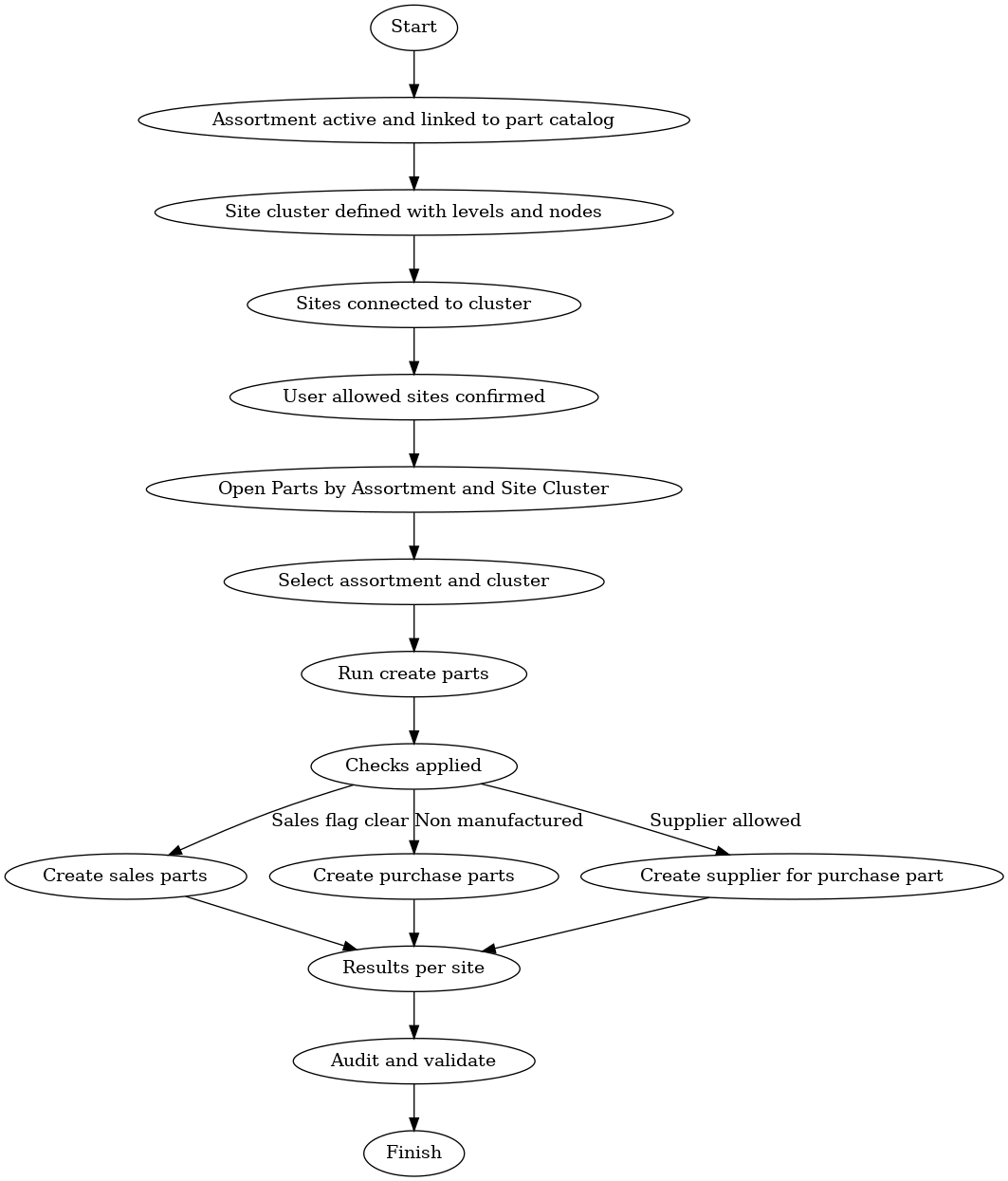
Ensure an assortment structure is active and connected to the part catalog.
-
Parts in the assortment will be created across all connected sites.
5. Apply Defaults
-
Set supplier links, sourcing rules, and sales/purchase part flags in the assortment.
-
Defaults cascade automatically.
6. Validate Permissions
-
Confirm sites are “user-allowed” for the operator running the process.
7. Run Mass Part Creation
-
Open Parts by Assortment and Site Cluster.
-
Select cluster and assortment, then run creation.
Automatic checks include:
-
Sales parts only created if the Do Not Create Sales Part flag is cleared.
-
Purchase parts created only for non-manufactured parts.
-
Supplier parts created if allowed by the flags.
Business Impact
Implementing site clusters delivers measurable value:
-
Speed: Shortens rollout cycles for new sites.
-
Consistency: Standardized part data across the enterprise.
-
Compliance: Enforced defaults for sourcing and supplier rules.
-
Cost savings: Fewer manual errors, less rework, and faster master data setup.
Example Hierarchy
A manufacturer opens new sites in Europe.
Cluster structure:

When the “Standard Bearings” assortment is applied to “Europe Operations,” all three plants receive identical part numbers, suppliers, and defaults at once.
Visual Guides
Diagram 1: Site Cluster Hierarchy
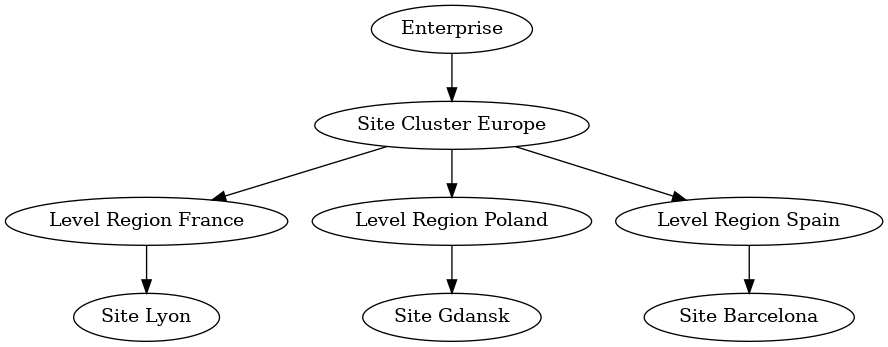
Diagram 2: Mass Part Creation Flow
Rollout Checklist
Pre-flight
-
Confirm part catalog and assortment are active
-
Define cluster naming standards
-
Confirm sites and user access
Build the Cluster
-
Create cluster root and levels
-
Add nodes for regions/countries
-
Connect sites to nodes
Defaults and Rules
-
Apply supplier and sourcing defaults
-
Set sales/purchase part flags
-
Record defaults in change log
Mass Creation Run
-
Test run first, review logs
-
Fix errors, rerun in production
-
Monitor execution results
Governance
-
Assign business and data owners
-
Weekly drift detection
-
Periodic audit of created parts
Validation After Go Live
-
Verify part attributes in sample sites
-
Check supplier links and pricing
-
Confirm warehouse and planning defaults
Rollback
-
Export created part IDs per site
-
Maintain rollback scripts
-
Keep backup references
Quick Reference for Training
Roles
-
Data steward runs assistants
-
Business lead approves defaults
-
IT monitors logs
KPIs
-
Time to enable a new site
-
Error rate during mass creation
-
Number of mismatched attributes found in audits
Conclusion
The site cluster is more than a configuration tool. It’s a strategic enabler that helps enterprises scale faster, enforce consistency, and govern master data effectively. Used properly, it turns what used to be tedious, error-prone setup work into a streamlined, controlled process that grows with the business.
- Details
In today’s volatile business environment, building a resilient supply chain is no longer optional. Disruptions such as natural disasters, geopolitical tensions, and supplier failures can have far-reaching consequences on operations, customer satisfaction, and profitability. IFS Cloud offers a comprehensive suite of tools designed to enhance supply chain resilience through real-time visibility, proactive risk management, and agile response capabilities.
This article explores how organizations can leverage IFS Cloud to future-proof their supply chains. We will delve into key strategies such as multi-tier supply chain collaboration, demand sensing, and scenario planning, and provide practical steps for implementation.
The Importance of Supply Chain Resilience
Supply chain resilience refers to an organization’s ability to anticipate, prepare for, respond to, and recover from disruptions. A resilient supply chain ensures business continuity, minimizes risks, and maintains customer trust even in the face of unexpected events.
Recent global events have highlighted the vulnerabilities in traditional supply chain models. Companies that have invested in resilience are better positioned to navigate disruptions, maintain operations, and capitalize on new opportunities.
Key Challenges in Supply Chain Management
Modern supply chains face several challenges that can impact their resilience
- Lack of Visibility. Many organizations struggle with limited visibility beyond their direct suppliers, making it difficult to anticipate and mitigate risks.
- Complexity. Global supply chains involve multiple stakeholders, regulations, and logistics networks, increasing the potential for disruptions.
- Demand Volatility. Fluctuating customer demand and market conditions require agile and responsive supply chain strategies.
- Risk Management. Identifying and managing risks across a multi-tier supply chain can be complex and resource-intensive.
How IFS Cloud Enhances Supply Chain Resilience
IFS Cloud provides a robust platform for building resilient supply chains. Its integrated suite of applications offers real-time data, advanced analytics, and collaborative tools that enable organizations to proactively manage risks and respond swiftly to disruptions.
Real-Time Visibility
One of the cornerstones of supply chain resilience is real-time visibility. IFS Cloud offers a unified view of inventory, demand, and supplier performance across the entire supply network. This visibility allows businesses to
- Monitor inventory levels and track shipments in real time.
- Identify potential bottlenecks and take corrective actions proactively.
- Collaborate effectively with suppliers and logistics partners.
Multi-Tier Supply Chain Collaboration
IFS Cloud facilitates multi-tier supply chain collaboration by providing tools for sharing data, tracking performance, and managing risks across the entire supply network. This collaboration extends beyond direct suppliers to include sub-suppliers and other stakeholders, ensuring a more resilient and responsive supply chain.
With IFS Cloud, businesses can
- Share demand forecasts and production plans with suppliers to align operations.
- Monitor supplier performance and compliance with contractual obligations.
- Collaborate on risk management and contingency planning.
Demand Sensing
Demand sensing uses real-time data and advanced analytics to predict customer demand more accurately. By leveraging machine learning and AI, IFS Cloud helps businesses adjust production, inventory, and logistics dynamically, reducing lead times and improving customer satisfaction.
Key benefits of demand sensing include
- Improved demand forecasting accuracy.
- Reduced stockouts and excess inventory.
- Enhanced ability to respond to market changes and customer needs.
Scenario Planning
Scenario planning involves creating and analyzing multiple «what-if» scenarios to prepare for potential disruptions. IFS Cloud supports scenario planning by providing simulation tools that help businesses evaluate the impact of different events and develop robust contingency plans.
With IFS Cloud, organizations can
- Model various disruption scenarios and assess their potential impact.
- Develop and test contingency plans to ensure business continuity.
- Make data-driven decisions based on real-time insights and predictive analytics.
Implementing Supply Chain Resilience with IFS Cloud
Building a resilient supply chain with IFS Cloud involves several key steps. Here’s a practical guide to get started
Step 1. Assess Current Capabilities
Begin by assessing your current supply chain capabilities and identifying areas for improvement. This assessment should include
- An evaluation of your existing supply chain processes and technologies.
- An analysis of potential risks and vulnerabilities.
- A review of your collaboration and communication strategies with suppliers and partners.
Step 2. Define Resilience Objectives
Clearly define your resilience objectives based on your business goals and risk appetite. These objectives may include
- Improving visibility across the supply chain.
- Enhancing collaboration with suppliers and partners.
- Reducing lead times and improving agility.
- Developing robust risk management and contingency plans.
Step 3. Implement IFS Cloud Solutions
Work with your IFS Cloud implementation partner to deploy the necessary modules and tools. Key areas to focus on include
- Supply Chain Planning. Use IFS Cloud’s planning and scheduling tools to optimize production, inventory, and logistics.
- Risk Management. Leverage IFS Cloud’s risk assessment and monitoring capabilities to identify and mitigate potential risks.
- Collaboration Platforms. Implement collaborative tools to enhance communication and data sharing with suppliers and partners.
- Analytics and Reporting. Utilize IFS Cloud’s analytics and reporting features to gain real-time insights and make informed decisions.
Step 4. Train and Empower Your Team
Ensure that your team is trained and empowered to use IFS Cloud effectively. Provide comprehensive training on the platform’s features and functionalities, and encourage a culture of continuous improvement and innovation.
Step 5. Monitor and Optimize
Continuously monitor your supply chain performance and use IFS Cloud’s analytics tools to identify opportunities for optimization. Regularly review and update your resilience strategies to adapt to changing market conditions and emerging risks.
Real-World Benefits of Resilient Supply Chains
Organizations that have implemented IFS Cloud for supply chain resilience have realized several tangible benefits, including
- Improved Visibility. Real-time data and analytics provide a unified view of the supply chain, enabling proactive decision-making.
- Enhanced Collaboration. Multi-tier collaboration tools foster stronger relationships with suppliers and partners, improving overall supply chain performance.
- Better Risk Management. Advanced risk assessment and monitoring capabilities help identify and mitigate potential disruptions early.
- Increased Agility. Demand sensing and scenario planning enable businesses to respond swiftly to market changes and customer needs.
- Cost Savings. Optimized inventory, production, and logistics reduce operational costs and improve efficiency.
Case Study. Transforming Supply Chain Resilience with IFS Cloud
One global manufacturing company faced significant supply chain disruptions due to geopolitical tensions and supplier failures. By implementing IFS Cloud, the company was able to
- Gain real-time visibility into its multi-tier supply chain, identifying potential risks and bottlenecks.
- Collaborate more effectively with suppliers and logistics partners, improving overall coordination and responsiveness.
- Use demand sensing to adjust production and inventory dynamically, reducing lead times and stockouts.
- Develop and test contingency plans using scenario planning tools, ensuring business continuity during disruptions.
The result was a more resilient and agile supply chain that could adapt to changing market conditions and maintain operations even in the face of unexpected events.
FAQ
Q: What is supply chain resilience and why is it important?
A: Supply chain resilience refers to an organization’s ability to anticipate, prepare for, respond to, and recover from disruptions. It is important because disruptions such as natural disasters, geopolitical issues, or supplier failures can significantly impact operations, customer satisfaction, and profitability. A resilient supply chain ensures continuity and minimizes risks.
Q: How does IFS Cloud enhance supply chain visibility?
A: IFS Cloud enhances supply chain visibility by providing real-time data and analytics across multiple tiers of suppliers. It integrates data from various sources to offer a unified view of inventory, demand, and potential risks, enabling proactive decision-making.
Q: What is multi-tier supply chain collaboration?
A: Multi-tier supply chain collaboration involves working closely with not just direct suppliers but also their suppliers and beyond. IFS Cloud facilitates this collaboration by providing tools for sharing data, tracking performance, and managing risks across the entire supply network.
Q: How can demand sensing improve supply chain agility?
A: Demand sensing uses real-time data and advanced analytics to predict customer demand more accurately. This allows businesses to adjust production, inventory, and logistics dynamically, reducing lead times and improving customer satisfaction.
Q: What role does scenario planning play in supply chain resilience?
A: Scenario planning involves creating and analyzing multiple «what-if» scenarios to prepare for potential disruptions. IFS Cloud supports scenario planning by providing simulation tools that help businesses evaluate the impact of different events and develop robust contingency plans.
Q: How can businesses implement risk management strategies using IFS Cloud?
A: Businesses can implement risk management strategies using IFS Cloud by leveraging its risk assessment tools, real-time monitoring capabilities, and automated alerts. These features help identify potential risks early and enable quick responses to mitigate their impact.
Q: What are the benefits of using IFS Cloud for supply chain management?
A: The benefits of using IFS Cloud for supply chain management include improved visibility, enhanced collaboration, better risk management, increased agility, and the ability to make data-driven decisions. It also helps reduce operational costs and improve overall efficiency.
Q: Can IFS Cloud integrate with existing ERP systems?
A: Yes, IFS Cloud is designed to integrate seamlessly with existing ERP systems. It supports various integration methods, including APIs and data connectors, to ensure smooth data flow and interoperability with other business applications.
- Details
Implementing IFS Cloud across multiple sites is a complex but rewarding journey. For CIOs, ERP program leaders, and supply chain managers, the key to success lies in balancing global standards with local needs, treating data migration as a strategic project, and establishing governance that scales. This guide provides actionable insights to help you avoid common pitfalls and achieve a seamless, sustainable rollout.
1. Standardization vs. Localization: Getting the Balance Right
Global templates accelerate deployment, but local rules such as tax regulations, labor laws, or reporting requirements often require deviations. The solution is to define upfront where standardization ends and localization begins. For example, VAT configurations in the EU will differ from sales tax setups in the US. Agree on these exceptions early to prevent rework and ensure compliance.
2. Data Migration: Treat It as a Project, Not a Task
Data migration is not a one-time activity. Each site presents its own data challenges, including different sources, inconsistent formats, and unique quirks. To manage this, assign ownership by domain (e.g., customer data, supplier information, item masters) and conduct trial runs early. These trials act as sanity checks, not dress rehearsals, helping you identify and resolve issues before they escalate.
3. Preventing Rollout Fatigue
Large-scale rollouts can lead to burnout, especially for teams working on later sites. To combat this, create a reusable «rollout kit» that includes training materials, test scripts, and troubleshooting guides. This ensures consistency, reduces redundant effort, and maintains high momentum across all locations.
4. Avoid Reinventing Interfaces
Local systems such as payroll, customs, or tax engines can complicate integrations. Instead of rebuilding interfaces for each site, capture integration patterns early. Use APIs, middleware, and OData projections to create reusable, versioned solutions. This approach saves time, reduces errors, and simplifies maintenance.
5. Scalable Governance: The Key to Consistency
Centralized control is impractical, but unchecked local deviations can lead to chaos. The solution is a «template board» where local changes are reviewed and approved transparently. This ensures that every adjustment is visible to all stakeholders, maintaining alignment and control without stifling flexibility.
6. Testing That Grows with Your Rollout
What works in one country may fail in another. Build a library of regression tests that expands with each rollout. Automate testing early to validate deployments confidently and efficiently, reducing the risk of site-specific issues slipping through the cracks.
Why This Approach Matters
Successful multi-site IFS Cloud implementations don’t treat each location as a separate project. Instead, they focus on repeatable processes, scalable solutions, and continuous learning. By doing so, organizations turn challenges into advantages, driving efficiency and growth across their global operations.
Real-World Impact
One global engineering firm applied these strategies to reduce supplier duplication by 40% and halve integration costs. By standardizing where possible, localizing where necessary, and treating data migration as a project, they transformed their rollout into a repeatable, scalable success.
Ready to Streamline Your Global Rollout?
If you’re ready to unify your business processes, boost efficiency, and drive growth, our experts can help. We specialize in multi-site IFS Cloud implementations, offering tailored strategies for clean data, solid migration plans, and repeatable governance. Contact us today to start your journey toward seamless enterprise integration.
Frequently Asked Questions
What are the key challenges in implementing IFS Cloud across multiple sites?
The main challenges include balancing global templates with local requirements, managing complex data migration, and establishing scalable governance frameworks. Addressing these requires careful planning and execution to ensure a successful deployment.
How can organizations manage local deviations in a multi-site IFS Cloud setup?
Organizations should define upfront when a site can deviate from the global template, especially for regional differences like tax configurations. This ensures consistency while accommodating local needs.
Why is data migration considered a project and not just a task?
Data migration involves cleaning legacy data, assigning domain ownership, and conducting trial runs to ensure seamless integration. Treating it as a project ensures thoroughness, reduces errors, and prevents last-minute surprises during implementation.
What strategies can prevent burnout during large-scale rollouts?
Develop reusable training materials, test scripts, and troubleshooting guides to facilitate efficient and effective training. Standardizing these resources ensures consistency, reduces resource strain, and maintains efficiency across all sites.
How can organizations avoid reinventing interfaces for local systems?
Capture integration patterns early using APIs, middleware, and OData projections. Versioning and reusing these patterns saves time, reduces complexity, and ensures scalability.
What is scalable governance, and why is it important?
Scalable governance involves a «template board» to consistently review and approve local changes. This ensures transparency, alignment, and control across all sites, preventing fragmented or unmanaged deviations from occurring.
How can organizations ensure consistent testing across multiple sites?
Build a growing library of regression tests and automate testing early. This enables efficient validation, confidence in deployments, and the ability to consistently ship updates across all locations.
Why is it important to treat a multi-site IFS Cloud rollout as a journey?
Treating it as a journey emphasizes building repeatable systems, learning from each rollout, and turning insights into scalable advantages. This mindset leads to sustainable, long-term success.
How can organizations get started with a multi-site IFS Cloud implementation?
Start by consulting experts specializing in multi-site IFS Cloud deployments. They can provide tailored guidance on data migration, governance, and best practices for a smooth implementation.